
Engine health
ControlLayer's lifecycle automation runs on a scheduled engine. Because your enforcement posture depends on it, the product watches the engine and tells you - visibly - if anything needs attention.
What the engine does each cycle
The engine is a chained scheduled job that runs every five minutes, clock-aligned - each pass does its work and then reschedules the next one. An independent hourly watchdog restores the chain if a pass ever fails to reschedule itself. Each pass:
- Activates scheduled windows whose start time has arrived.
- Expires active windows whose end time has passed.
- Retries windows in error, up to the configured ceiling.
- Reconciles enforcement state - recomputing what every scope's value should be from the set of active windows and correcting any drift, including manual edits, missing rows, and orphaned entries.
Bypass operations are planned in minutes-to-hours, and a five-minute worst-case latency on scheduled transitions keeps the engine light. A window scheduled for 1:23 pm activates on the pass that follows - by ~1:25 pm. Immediate windows don't wait for the engine at all; they activate at submission.
The three health states
Because the product's promise is that a bypass turns itself off, the dangerous failure is a dead engine leaving windows active forever. So health is reported, never assumed. It resolves to exactly one of three states:
| State | Meaning |
|---|---|
| Healthy | The chain is scheduled and on time, and the watchdog is alive. |
| Degraded | One leg is down. Either the chain is missing or overdue but the watchdog will restore it, or the watchdog is gone while the chain still runs. |
| Offline | The chain is dead and there is no watchdog - nothing will run until someone restarts the engine. |
A chain fire may run up to two minutes late under platform load without being counted overdue.
How health is surfaced
- Dashboard health strip: when the engine is Healthy, a quiet green chip in the dashboard footer says so and otherwise stays out of your way.
- Warning banner: Degraded or Offline raises a loud banner with a one-click Restart Engine action, so the condition cannot be missed during day-to-day work.
- Watchdog: the hourly watchdog monitors the engine itself - the component whose job is noticing problems is itself monitored.
- Error windows: windows that exhausted their retries are surfaced for admin attention rather than failing silently.
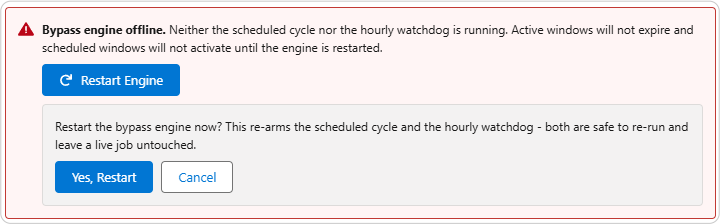
If the engine is not running
- Check Setup → Scheduled Jobs for the ControlLayer scheduler entries.
- Scheduled Apex jobs can be removed by org admins or blocked by org-wide limits (100 scheduled jobs per org). If the chain or the watchdog is missing, click Restart Engine on the dashboard - it reschedules both and is safe to run more than once.
- Once the engine resumes, it self-corrects: overdue activations and expiries are processed on the next pass, and reconciliation restores enforcement to exactly what the active window set dictates. Missed transitions are delayed, never lost.
What "healthy" means operationally
| Signal | Healthy state |
|---|---|
| Scheduler | Chain present and running on its five-minute cadence |
| Watchdog | Hourly job present, ready to restore the chain |
| Error windows | None resting in Error status |
| Enforcement drift | None - reconciliation reports nothing to correct |
| Terminal hygiene | Expired/deactivated windows closed out, none stuck mid-transition |